
To generate an ER diagram from an existing PostgreSQL or MySQL database, read the schema out of the database's system catalog and draw one table per relation and one line per foreign key. You can do that four ways. A desktop client can connect and draw it (pgAdmin's ERD tool, MySQL Workbench's Reverse Engineer, DbSchema). A CLI can dump the catalog to a text format (db2dbml writes DBML). A script can print Mermaid. Or you can run one read-only catalog query in any SQL client and paste the JSON it returns into a browser editor (ChartDB, and since October 2026 drawDB). Use the query when you want a diagram you will keep editing and you don't want a diagram tool holding your production credentials. Use pgAdmin or Workbench when you need a picture once and already have them open.
Whichever you pick, the diagram can only show what the database enforces. We pushed 87 schemas from the drawDB gallery through the round trip: export the DDL, create it on PostgreSQL 16 or MySQL 8.0, run drawDB's import query, and compare the result with the original diagram. All 1,076 tables, 9,491 columns and 1,840 foreign keys came back. 14 of those foreign keys came back with a different cardinality than the diagram had drawn, and MySQL returned 125 indexes nobody had written. Both effects are explained below, and the second half of this post is what they tell you about the diagram you are about to generate.
What are the ways to reverse-engineer an ER diagram from a database?
| Approach | Example | Needs a connection from | Output | Editable afterwards |
|---|---|---|---|---|
| Desktop client | pgAdmin ERD tool, MySQL Workbench, DbSchema | the client | diagram inside the client | yes, in that client |
| CLI to a text format | db2dbml from the DBML project | the CLI | .dbml file | yes, as text or in any DBML editor |
| SQL that prints Mermaid | Cybertec's script | your SQL client | Mermaid erDiagram text | as text |
| Catalog query, paste the result | ChartDB, drawDB | your SQL client | JSON pasted into a browser editor | yes, on a canvas |
The first two need the tool itself to reach your database, with a connection string that has a password in it. That is fine against a local copy and a harder conversation against production. pgAdmin's "ERD for database" fetches every table in every schema. Workbench's wizard is under Database › Reverse Engineer, and its docs warn that auto-placement may fail once you select 250 or more objects.
The Mermaid route is the lightest, but Cybertec's script draws every foreign key as one-to-many and leaves you with text, not a layout you can move.
The paste route splits the work. Your SQL client, which already has the credentials, runs the query. The editor only ever sees the JSON, which holds names, types, keys and comments, and no rows.
How do you generate an ER diagram from a PostgreSQL database in drawDB?
- Open the editor, start a new diagram, pick PostgreSQL, then choose Import from database. On an existing diagram it is under File › Import from database.
- Copy the query from the left pane, or download it as
drawdb-schema.sql. - Run it in psql, DBeaver, pgAdmin, DataGrip or the Supabase SQL editor. It returns one row with one value.
- Paste that value into the right pane. drawDB builds the tables, lays them out and fits them to the screen.
GUI clients sometimes truncate a long value, so for a large schema run it from the command line and upload the file instead:
psql -At -d mydb -f drawdb-schema.sql > drawdb-schema.json-A turns off alignment and -t drops the header and row count, so the file is exactly one JSON document. The query needs PostgreSQL 9.4 or later. It skips pg_catalog, information_schema and other pg_ schemas, and leaves partitions out, so a partitioned table shows up once. Tables outside public keep their schema prefix, such as billing.invoices.
How do you do the same for MySQL, MariaDB, SQLite, SQL Server and Oracle?
The flow is identical. Only the query and the command change:
| Database | Minimum version | Command for a large schema |
|---|---|---|
| PostgreSQL | 9.4 | psql -At -d <database> -f drawdb-schema.sql > drawdb-schema.json |
| MySQL | 8.0.16 | mysql -N -r -D <database> < drawdb-schema.sql > drawdb-schema.json |
| MariaDB | 10.5 | mariadb -N -r -D <database> < drawdb-schema.sql > drawdb-schema.json |
| SQLite | 3.38 | sqlite3 <database-file> < drawdb-schema.sql > drawdb-schema.json |
| SQL Server | 2017 | sqlcmd -S <server> -d <database> -y 0 -i drawdb-schema.sql -o drawdb-schema.json |
| Oracle | 12.2 | SQL*Plus with SET LONG raised; drawDB shows the full command |
For MySQL, -N drops the column header and -r stops the client from escaping the backslashes inside the JSON. The query reads DATABASE(), so it diagrams whichever database you pass with -D. MySQL's information_schema only lists objects you hold some privilege on, so a user that can see half the tables gets half a diagram. On Oracle, column defaults are not imported.
How does an introspected diagram decide between one-to-one and many-to-one?
A foreign key constraint has no cardinality of its own. REFERENCES users(id) says every value must exist in users, and nothing about how many rows may share it. So the only honest rule is the one drawDB's query uses: a foreign key is one-to-one when a unique index, or the primary key, covers exactly the foreign key's columns. Otherwise it is many-to-one.
You can run the same check on its own to see what any tool will draw before you import:
SELECT con.conrelid::regclass AS child_table,
       con.confrelid::regclass AS parent_table,
       con.conname AS foreign_key,
       CASE WHEN EXISTS (
         SELECT 1 FROM pg_index i
         WHERE i.indrelid = con.conrelid
           AND i.indisunique
           AND i.indpred IS NULL
           AND i.indexprs IS NULL
           AND i.indkey::int2[] @> con.conkey
           AND i.indkey::int2[] <@ con.conkey
       ) THEN 'one-to-one' ELSE 'many-to-one' END AS cardinality
FROM pg_constraint con
WHERE con.contype = 'f'
ORDER BY 1, 3;
The two array operators together mean "the same set of columns", so a composite unique index on (order_id, product_id) does not make a foreign key on order_id alone one-to-one. A shared primary key counts, because the primary key is a unique index. A partial unique index does not, because it allows duplicates outside its WHERE.
Why did 14 relationships come back with a different cardinality?
Because the diagrams said one thing and the DDL enforced another, and the database only knows the DDL. Across the 87 schemas, 1,826 foreign keys matched exactly. The other 14 split two ways.
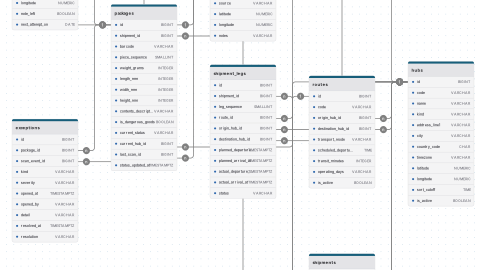
11 were drawn as many-to-one but are enforced as one-to-one. On the parcel tracking schema, proofs_of_delivery has UNIQUE on both package_id and delivery_attempt_id: one proof per package, one per attempt. The diagram drew both as plain many-to-one lines. The same thing happened to licenses.assigned_user_id on the Zoom schema, rentals.reservation_id on the car rental schema, and trips.request_id on the Uber schema. The constraint was right and the drawing was understated.
3 were drawn as one-to-one but nothing enforces it. articles.live_revision_id on the news paywall schema, iap_receipts.purchase_id on the in-game economy schema and users.root_folder_id on the Dropbox schema all have a one-to-one line and a plain nullable column. Two articles can point at the same live revision, and the database will accept it. This is the worse direction, because the diagram promises a rule the database doesn't keep. We covered how to enforce one in one-to-one relationships in SQL.
So the first useful thing a generated diagram gives you is a list of lines to check. If a relationship you think of as "one per" is drawn as many-to-one after import, the constraint is missing.

Why does a MySQL import show indexes you never created?
On MySQL, the round trip returned 362 indexes for 14 schemas whose DDL declared 237. Every one of the 125 extras sits on the columns of a foreign key that had no index of its own. InnoDB needs an index on the referencing columns to enforce a foreign key, and the MySQL manual says "such an index is created on the referencing table automatically if it does not exist." The import is reporting what is really there.
PostgreSQL does the opposite. Its docs say a foreign key "does not automatically create an index on the referencing columns", so our 73 PostgreSQL schemas came back with exactly the indexes their DDL declared. If you move a schema from MySQL to PostgreSQL, those implicit indexes don't come along, and a DELETE on the parent table has to scan the child for every row it removes. A diagram imported from the MySQL side shows you which ones to recreate.
The other differences were cosmetic. PostgreSQL stores DECIMAL as NUMERIC (they are the same type), so 44 columns came back renamed. BIGSERIAL is not a real type either: it comes back as BIGINT with auto-increment set. Three single-column unique indexes came back as UNIQUE on the column instead of a separate index entry. That is the same constraint, shown differently.
What doesn't make it into the diagram?
The gallery schemas are plain tables, keys and indexes, so we built one more with the features that usually break an import, and ran the query on PostgreSQL 16:
CREATE SCHEMA billing;
CREATE TYPE order_status AS ENUM ('pending', 'paid', 'shipped');

CREATE TABLE users (
  id bigint GENERATED ALWAYS AS IDENTITY PRIMARY KEY,
  email text NOT NULL,
  deleted_at timestamptz,
  tags text[] NOT NULL DEFAULT '{}',
  email_domain text GENERATED ALWAYS AS (split_part(email, '@', 2)) STORED
);
CREATE UNIQUE INDEX users_email_lower_key ON users (lower(email));
CREATE UNIQUE INDEX users_email_live_key ON users (email) WHERE deleted_at IS NULL;

CREATE TABLE profiles (
  user_id bigint PRIMARY KEY REFERENCES users (id) ON DELETE CASCADE,
  bio text
);

CREATE TABLE orders (
  id serial PRIMARY KEY,
  user_id bigint NOT NULL REFERENCES users (id),
  status order_status NOT NULL DEFAULT 'pending',
  total numeric(12, 2) NOT NULL CHECK (total >= 0)
);

CREATE TABLE billing.invoices (
  id uuid PRIMARY KEY DEFAULT gen_random_uuid(),
  order_id int NOT NULL UNIQUE REFERENCES orders (id)
);

CREATE VIEW paid_orders AS SELECT * FROM orders WHERE status = 'paid';
CREATE MATERIALIZED VIEW order_totals AS
  SELECT user_id, sum(total) FROM orders GROUP BY user_id;
What came through: the identity column and the serial column as auto-increment, the enum with its three values, tags as a text array, billing.invoices with its schema prefix, profiles as one-to-one through its shared primary key, invoices as one-to-one through its unique order_id, and the ON DELETE CASCADE.
What didn't, and was counted in the "not imported" message instead: both views, the CHECK on total, and both unique indexes on users, one because it is on an expression and one because it is partial. That last one matters. The partial index is how you keep emails unique among live rows under soft delete (the pattern is here), and after import, email looks like an ordinary column. Add it back as a note or an index by hand if the diagram is the spec.
One more catch: email_domain comes back as an ordinary column whose default is split_part(email, '@'::text, 2). A generated column is not a default, so mark it in a comment before you export the diagram back to SQL.
Nothing reads triggers, functions, row-level security policies, grants or sequences beyond their use as auto-increment. That is true of every approach in the table above that produces an ER diagram, because none of those objects has a place in one.
Is it safe to run an introspection query against production?
Yes, with two caveats. The query is a single SELECT over catalog tables and never reads a row of your data. Every one of our 73 PostgreSQL round trips returned in under a second and a half, including the time to start psql inside Docker. Run it on a read replica if you have one anyway, since the result is the same.
The caveats are about what you paste. Column and table comments come back verbatim, and teams sometimes write things in comments they would not put in a shared diagram. Default values come back verbatim too. Read the JSON before you paste it somewhere your whole company can see.
The next step is to run the query on your own database, then open the editor and paste the result. Check the lines that came back as many-to-one where you expected one-to-one, and the partial indexes the import couldn't show. Those are the places your schema and your mental model of it disagree.
Frequently asked questions
Can I generate an ER diagram from a database without giving a tool my credentials?
Yes. Run a read-only catalog query in a client you already trust, such as psql, mysql or DBeaver, and paste the single JSON value it returns into the diagram tool. drawDB and ChartDB both import that way. The tool only ever sees table, column, key and comment metadata, never a connection string and never a data row.
Why does my ER diagram show a foreign key as many-to-one when it should be one-to-one?
Because nothing in the database says it is one-to-one. Introspection derives cardinality from constraints: a foreign key is one-to-one only when a unique index or the primary key covers exactly its columns. Add a UNIQUE constraint on the foreign key column, or make it the primary key, and the next import draws it as one-to-one.
How do I diagram only one PostgreSQL schema instead of the whole database?
drawDB's query imports every non-system schema and prefixes tables outside public with their schema name, such as billing.invoices. Import everything and delete the tables you do not want, or restore just that schema into a scratch database with pg_dump --schema-only -n billing and run the query there. A restricted user does not help: PostgreSQL's catalogs list every table to every user. In MySQL the query reads DATABASE(), so pass the database you want with -D.
Does reverse-engineering read any of the data in my tables?
No. Every approach in this post reads the system catalog: pg_class, pg_attribute and pg_constraint in PostgreSQL, information_schema in MySQL. Column comments and default values are the only free text that comes back, so check those if the diagram will be shared outside the team.